
An agent that answers questions on demand is only as useful as your habit of asking it. The interesting engineering starts when you want the agent to run on its own, because now nobody is there to catch a bad date range or an unsupported claim before it goes out. This post walks through how I moved one of my agents onto a schedule with Mastra, and the decisions that came with it.
One of my favorite agents I’ve built with Mastra is called Beacon. It tracks analytics across my content: Google Analytics, PostHog, and YouTube Studio. I find myself enjoying Slack as the interface for my agents. It just feels natural. When this exchange happened, I was still going through Emma, the supervisor agent that routed analytics questions to Beacon. Beacon has its own Slack app now. A typical exchange looks like this:
@Emma tell me how our traffic looked week over week from the past month
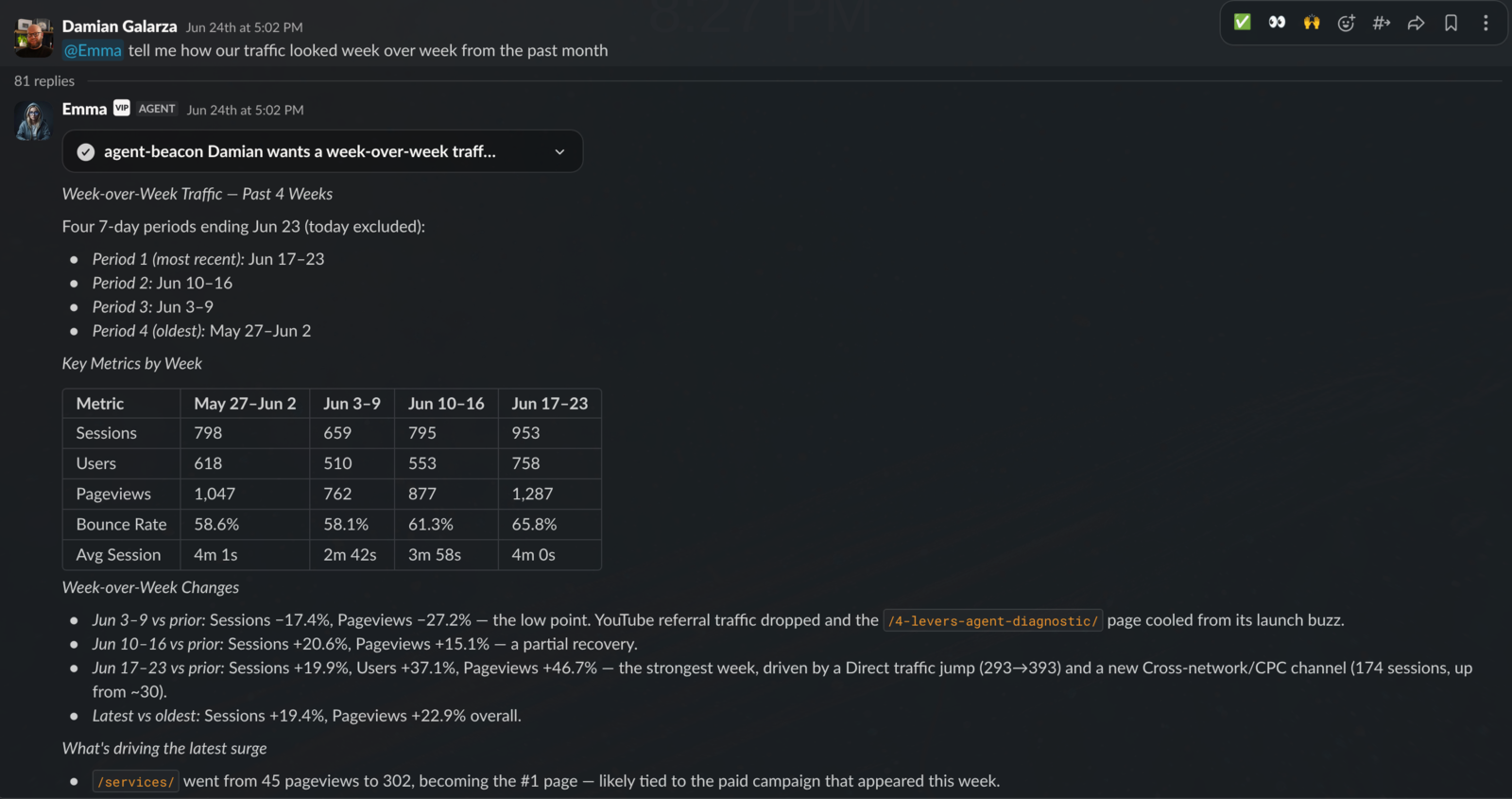
What I find most interesting here isn’t that Beacon pulled four 7-day periods from GA4 and laid out the numbers. It’s that it noticed an anomaly and brought it to my attention:
/services/went from 45 pageviews to 302, becoming the #1 page. Likely tied to the paid campaign that appeared this week.
I confirmed with Beacon that this was in fact the case. I had been trying out a small sampling of Google Ads. From there, Beacon dug in further: 174 sessions from the campaign, five CTA clicks, zero downstream conversions, and a list of what to check next. Beacon also has access to the website’s codebase, so it can connect what the analytics say to what the pages actually do.
This is great, but I still had to go into Slack and ask. Not bad, but we can do better. I’d rather my agent be doing this on its own than relying on me to initiate. I wanted the weekly version of this report to show up on Monday morning without me in the loop.
Two Ways to Schedule Work in Mastra
Mastra has two primitives for this, and the choice between them shaped everything else in the implementation.
Schedules let you attach a cron to an agent. On each fire, the agent receives a prompt and runs. For “ask Beacon this question every Monday,” that is the simplest possible setup.
Scheduled workflows let you attach a cron to a workflow instead. On each fire, the workflow runs from its first step with a fixed inputData.
I went with the workflow, and the reason is delivery. The report has to be posted to Slack, and posting is a mutation. Beacon is otherwise read-only by design: every analytics tool it has returns data and nothing else. An agent schedule would have needed a Slack-posting tool exposed to the model so the agent could deliver its own report. That turns the side effect into something the model decides to do, and it leaves a mutation capability sitting in Beacon’s toolset during ordinary conversations.
A workflow lets me split the job in two:
- Generate the report. The model does this with a precise prompt and read-only tools.
- Deliver the report. Plain code does this, with no model involved.
If you’ve read my agent loops vs. workflows post, this is the same boundary applied to a recurring job. Use the model for judgment, the workflow for control, and deterministic code for side effects.
Declaring the Schedule on the Workflow
Here is the shape of it, trimmed from src/mastra/workflows/weekly-website-performance.ts:
// src/mastra/workflows/weekly-website-performance.ts
import { createStep, createWorkflow } from '@mastra/core/workflows'
import { z } from 'zod'

const weeklyReportInputSchema = z.object({
  firedAt: z.string().datetime().optional(),
})

const generatedReportSchema = z.object({
  text: z.string(),
  channelId: z.string().regex(/^[CG][A-Z0-9]{8,}$/),
})

const deliveryResultSchema = z.object({
  delivered: z.literal(true),
  channelId: z.string().regex(/^[CG][A-Z0-9]{8,}$/),
})

export const weeklyWebsitePerformanceReportWorkflow = createWorkflow({
  id: 'weekly-website-performance-report',
  inputSchema: weeklyReportInputSchema,
  outputSchema: deliveryResultSchema,
  schedule: {
    cron: '0 9 * * 1',
    timezone: 'America/New_York',
    inputData: {},
  },
})
  .then(generateWeeklyWebsitePerformanceReportStep)
  .then(deliverWeeklyWebsitePerformanceReportStep)
.commit()The schedule field is the entire scheduling configuration. Nothing else calls schedules.create(), seeds a row, or hooks startup. When Mastra boots with a storage adapter configured, it reads the declared schedule off every registered workflow, writes a row with the derived ID wf_weekly-website-performance-report, and enables its scheduler worker automatically because at least one workflow declares a schedule.
Mastra reconciles that row on every boot rather than inserting it once. I read through the sync logic in @mastra/core to confirm what it touches. On a later boot, if the cron or timezone in code changed, Mastra patches those fields and recomputes the next fire time. It never touches status. If you pause the schedule from Studio, a restart leaves it paused. Remove the schedule field from the workflow and the row is deleted on the next boot.
You do need storage for this. Without a storage adapter, Mastra never starts the scheduler at all, and the adapter has to support concurrent updates (libSQL and Postgres both do). An in-memory store will run the schedule but loses the row on restart. I’m on Postgres. Once it’s running, the schedule shows up in Mastra Studio under /workflows/schedules with pause, resume, and run-now controls.
Step 1: Generate With Beacon Itself
The generation step calls Beacon itself, the same agent I talk to in Slack, with its full analytics toolset. My first two versions used a separate stripped-down agent for this job. I’ll get to why that went away. Three decisions shape the call.
Memory for judgment, not for evidence. My first version of this agent had no memory at all, and I liked the clean slate. The problem is that a clean slate throws away the one thing I’d want a Monday report to know: what I’m working on. If I’ve been running a Google Ads test all week, I want the report to lead with the campaign, not bury it under the same five headline numbers. So the scheduled run uses Beacon’s website memory, but read-only and narrow. It gets the curated working memory (goals, experiments, caveats, preferences) and nothing else. Recent messages, semantic recall, and observational memory are all off, and the run never writes its report back. The working-memory template also refuses to hold numbers. It says, in so many words, never retain dates, metric values, percentages, deltas, ranks, counts, or quantitative conclusions. Memory can shape what the report emphasizes. It cannot be where a number came from.
The snapshot comes first. A prepareStep hook forces getWebsiteAnalyticsSnapshot on the first model step, then hands tool choice back to Beacon. In one of the early live runs Beacon skipped the snapshot entirely. Forcing the first step closed that door. After it, Beacon can reach for its other analytics tools if the report calls for them, and since every analytics tool it has is read-only, I’m fine with that.
The gate is at the tool boundary, not the prose. The workflow doesn’t trust the report text on its own. Before delivery it checks the evidence Beacon collected, which I’ll cover below. What it deliberately does not do is parse the report.
The step itself computes the date range, builds the prompt, and runs Beacon in the website memory scope:
// src/mastra/workflows/weekly-website-performance.ts
export function completedWeeklyReportRanges(firedAt: Date) {
  const runtimeDate = runtimeTodayIsoDate(firedAt, 'America/New_York')
  const runtimeWeekday = new Date(`${runtimeDate}T00:00:00Z`).getUTCDay()
  const daysSinceMonday = (runtimeWeekday + 6) % 7
  const currentEndDate = addIsoDays(runtimeDate, -(daysSinceMonday + 1))
  const currentStartDate = addIsoDays(currentEndDate, -6)

  return {
    currentPeriod: { startDate: currentStartDate, endDate: currentEndDate },
    priorPeriod: {
      startDate: addIsoDays(currentStartDate, -7),
      endDate: addIsoDays(currentEndDate, -7),
    },
  }
}

function prepareWeeklyReportGenerationStep({ stepNumber }: { stepNumber: number }) {
  return stepNumber === 0
    ? { toolChoice: { type: 'tool' as const, toolName: 'getWebsiteAnalyticsSnapshot' } }
    : { toolChoice: 'auto' as const }
}

export const generateWeeklyWebsitePerformanceReportStep = createStep({
  id: 'generate-weekly-website-performance-report',
  inputSchema: weeklyReportInputSchema,
  outputSchema: generatedReportSchema,
  execute: async ({ inputData, mastra }) => {
    const firedAt = inputData.firedAt ? new Date(inputData.firedAt) : new Date()
    const ranges = completedWeeklyReportRanges(firedAt)
    const channelId = weeklyReportSlackChannelId()

    const requestContext = new RequestContext()
    markBeaconWebsiteMemoryScope(requestContext)
    const result = await mastra.getAgent('beacon').generate(buildWeeklyWebsitePerformancePrompt(firedAt), {
      prepareStep: prepareWeeklyReportGenerationStep,
      requestContext,
      memory: {
        resource: BEACON_WEBSITE_RESOURCE_ID,
        thread: BEACON_WEEKLY_REPORT_MEMORY_THREAD_ID,
        options: {
          readOnly: true,
          lastMessages: false,
          semanticRecall: false,
          observationalMemory: false,
        },
      },
    })

    const snapshotFailures = weeklySnapshotContractFailures(result, ranges)
    if (snapshotFailures.length > 0) {
      throw new Error(`Weekly website performance report evidence failed: ${snapshotFailures.join('; ')}`)
    }

    return { text: result.text, channelId }
  },
})
Dates in Code, Not in the Prompt
When I ask Beacon a question in Slack, it resolves “the past month” itself from a runtime date it’s given. That works in conversation because I’m there to catch a bad interpretation. On a schedule, nobody is watching.
So the step computes the most recently completed Monday-through-Sunday range in America/New_York and passes the model exact ISO dates. The prompt says “Prepare the weekly website performance report for 2026-08-17 through 2026-08-23” and “call getWebsiteAnalyticsSnapshot exactly once with these arguments.” The model has nothing to interpret.
A nice property falls out of this. The schedule passes inputData: {}, so firedAt defaults to the time the step actually runs. If the runtime was down at 9:00 Monday and the job fires late, or I trigger it by hand on Wednesday, the range is still the previous complete week. Any time from Monday to Sunday resolves to the same answer.
Validate the Destination Before Spending Tokens
weeklyReportSlackChannelId() reads BEACON_WEEKLY_REPORT_SLACK_CHANNEL_ID from the environment and checks that it looks like a raw Slack channel ID. It runs before the model call. A misconfigured destination fails in milliseconds instead of after a GA4 pull and a model generation. The validated ID then rides through the workflow as typed step output, so the delivery step never reads config on its own and the model never sees it.
There are two channel IDs in the environment now, and they do different jobs. BEACON_WEEKLY_REPORT_SLACK_CHANNEL_ID is where the report goes. BEACON_WEBSITE_SLACK_CHANNEL_ID is the channel whose conversations share Beacon’s website memory, and it stays fixed even when I redirect delivery somewhere else. Keeping them separate is what lets a canary run post to a test channel without teaching Beacon that test-channel conversations are about my website.
An Evidence Contract Before Delivery
The model’s text is not trusted on its own. The weeklySnapshotContractFailures check inspects the generation result and requires all of the following:
- exactly one call to
getWebsiteAnalyticsSnapshot - with
startDateandendDatematching the computed week andincludePriorPeriod: true - and a successful tool result whose
data.startDate,data.endDate, anddata.priorPeriodmatch the same dates, withsource: 'ga4', a read-only mutation policy on the envelope, and finite traffic totals for both periods
If any of that is missing, the step throws and nothing is posted. A report that reads well but wasn’t backed by the right tool call for the right week fails the run. The same contract function runs in the eval suite, so the runtime check and the regression test can’t drift apart.
For a while this contract did more. I had the prompt dictate a fixed bullet shape for the five headline metrics, and the contract parsed the report text and checked every number and comparison against the snapshot totals. It was about 200 lines of regex and tolerances, and it felt rigorous. Then a live run produced a correct, source-backed report and the parser rejected it over wording. I was maintaining a grammar for the model’s prose, and the grammar was what kept failing, not the model. The gate belongs at the tool boundary. Prove the right evidence was collected for the right week, then let Beacon write the report the way it writes one in Slack. The prompt still says to base every number on the snapshot, and the memory template still refuses to store any, so the only place a number can come from is the call the contract just verified.
Step 2: Deliver With Code
The delivery step has no model in it:
// src/mastra/workflows/weekly-website-performance.ts
function sanitizeScheduledSlackReport(text: string) {
const report = text.trim()
if (!report) throw new Error('Weekly website performance report is empty')
return report.replace(/<(?=[!@#])([^>\n]+)>/g, '<$1>')
}
export const deliverWeeklyWebsitePerformanceReportStep = createStep({
id: 'deliver-weekly-website-performance-report',
inputSchema: generatedReportSchema,
outputSchema: deliveryResultSchema,
execute: async ({ inputData, mastra }) => {
const report = sanitizeScheduledSlackReport(inputData.text)
const channels = mastra.getAgent('beacon').getChannels()
if (!channels) throw new Error('Beacon Slack Channels SDK is not initialized')
await channels.initialize(mastra)
const sdk = channels.sdk
if (!sdk) throw new Error('Beacon Slack Channels SDK is not initialized')
await sdk.channel(`slack:${inputData.channelId}`).post(report)
return { delivered: true as const, channelId: inputData.channelId }
},
})Beacon is already connected to Slack through Mastra Channels, which handles inbound mentions and replies. Channels doesn’t hand the agent a “post a message” tool, and I didn’t want to add one. But the Channels SDK is available to code, and sdk.channel('slack:C…').post(text) writes a new top-level message to a channel. The delivery step borrows Beacon’s existing connection to send it.
The report agent is told not to use Slack mentions, and the output processor normalizes Markdown into Slack mrkdwn. Still, the model could emit <!channel> or <@U…> and page everyone in the channel. The regex neutralizes control mentions and leaves ordinary links alone.
Rolling It Out
A schedule that posts to a real channel is not something I wanted to enable and hope for. The rollout used the fact that a paused schedule can still be run by hand:
- Boot the runtime once so Mastra writes the schedule row. Pause it in Studio and confirm the status persists as
paused. - Point
BEACON_WEEKLY_REPORT_SLACK_CHANNEL_IDat a test channel, leave the memory channel alone, and restart. Confirm the schedule stays paused. - Trigger one immediate run through the schedule API. Confirm a new top-level message lands in the test channel.
- Swap the environment variable to the production channel, restart, confirm Beacon’s Slack app is a member of that channel, and only then resume the schedule.
The first real run is scheduled for the following Monday at 9:00 Eastern. I got the full workflow exercised end to end, including the actual Slack post, without ever opening the recurring path to production before the destination was confirmed.
What I Would Watch
Two open edges I haven’t addressed yet.
Failures are quiet. A failed run shows up in Studio and in the workflow trace, but nothing tells me about it. A transient GA4 error on the forced first step will fail the evidence check with no retry. For a weekly report that’s a tolerable first version. The next change is a retryConfig on the generation step and a deterministic “report failed” post so a missed Monday is visible in the same channel.
Delivery is coupled to the in-process Channels SDK. The workflow reaches into the running Beacon agent for its Slack connection. That already bit me once: a manual run reached the delivery step before Channels had finished connecting, which is why the step now awaits channels.initialize(mastra) before touching the SDK. It’s fine while the scheduler runs in the same process as the agent. If I ever move the scheduler to a standalone Mastra worker, that step will fail closed and need its own Slack client.
Where Else This Applies
This is one use case for scheduling agents. The same shape works for any recurring job where a model should summarize and code should act. Some others that come to mind:
- A nightly runtime health digest. The diagnostics tools already exist for on-demand use. The change is a schedule and a delivery step.
- Weekly Search Console query drift, flagging queries that gained or lost position.
- A Monday content-pipeline status pulled from Notion, listing what’s scheduled and what’s blocked.
If the output needs to go somewhere, keep that step out of the model’s hands.
If you’re building recurring agent jobs with Mastra and working out where the model should stop and code should take over, I help teams design that boundary in production. See how I help Mastra teams.
Further Reading
- How to Run an AI Agent on a Schedule (YouTube) is the companion video for this post. It walks through the schedule, the two-step workflow, and the manual run in Mastra Studio.
- Agent Loops vs. Workflows: The Boundary That Makes AI Reliable is the general version of the judgment, control, and side-effect split this post applies to a scheduled job.
- Human-in-the-Loop Agent Approvals: A Mastra Pattern covers the other way to keep mutations out of the model’s hands when a human does need to be in the loop.
- How I Built a Personal AI Assistant with Mastra is where I first scheduled agent work by polling a task table. The declarative
schedulefield replaces that. - Mastra Scheduled Workflows is the official reference for the
schedulefield and schedule management. - Mastra Schedules documents the agent-level alternative.
- Mastra Channels covers the Slack integration the delivery step borrows.