“Agent” has become one of those words that sounds precise until you try to build one.
A chatbot, a workflow, and an actual agent might all call the same model, but they’re built for very different problems. When one of them misbehaves, the instinct is to reach for the model: pick a better one, write a better prompt, swap the framework. Sometimes that’s the fix. Most of the time, the model isn’t where the problem lives.
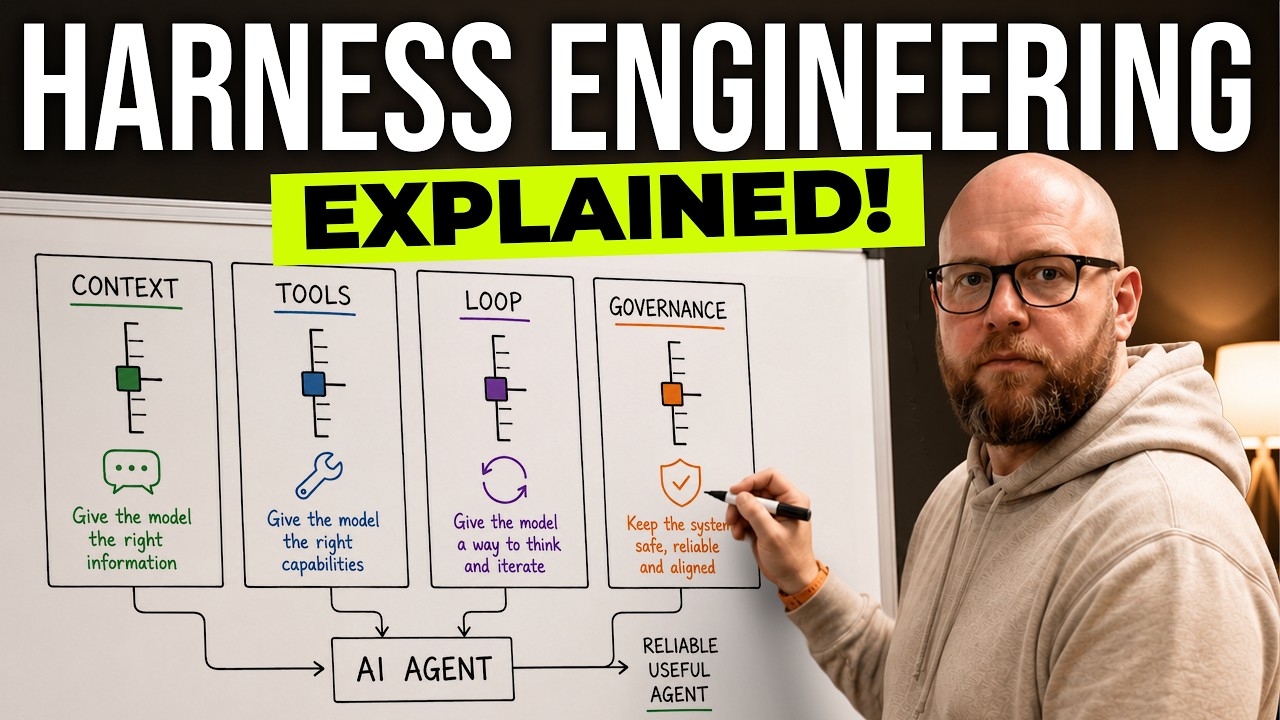
That’s where harness engineering comes in. The harness is the system around the model, and it gives us a way to reason about agent behavior without throwing our hands up and saying “the model is dumb.” Once the model can choose actions over time, the question is no longer just how good is the model? It’s a different set of questions. What does the model see, what can it do, how does it run, and what boundaries does it have?
Those are the four levers. Context, Tools, Loop, and Governance. Learn them and you can diagnose almost any agent failure in under a minute.
Short answer: Harness engineering is the design of the system around an AI model. For agents, that means the context it sees, the tools it can use, the loop it runs inside, and the governance boundaries that keep its autonomy pointed at the right outcome.
| Lever | What it controls | Diagnostic question |
|---|---|---|
| Context | What the model sees | Did the model have the right information, in the right shape, at the right moment? |
| Tools | What the model can do | Did it have the right action surface, exposed clearly and safely? |
| Loop | How the agent acts over time | Did it know what to do next, when to continue, and when to stop? |
| Governance | What bounds the autonomy | Did it have the right permissions, approval gates, and hard limits? |
The failure pattern you already know
If you’ve built one of these systems, or even just spent enough time with Claude Code, this probably sounds familiar.
The model has the information somewhere, but doesn’t use it. It has the right tool available, but reaches for the wrong one. It works for a while, then loops, stalls, or confidently announces it’s done when it clearly isn’t.
It’s tempting to file all of that under model quality. But those are three different problems, and they live in three different parts of the system. Naming where each one lives is most of the work. The four levers are how you name them.
What actually makes something an agent
To see why the harness matters, it helps to look at how building with LLMs has evolved.
It started with basic LLM features. Your application calls a model with a prompt, and the model returns something: a summary, a classification, a rewritten email, a list of extracted fields. The app owns the path. The model performs a single transformation and hands control back.
The model does one job. The application controls everything before and after it.
Then came workflows. Instead of one model call, your code coordinates several: multiple LLM calls, tool calls, retries, structured outputs, all wired together to accomplish a goal. The model is doing more work, but the path is still mostly predetermined. Code is driving. This is still the right design when the task has a known shape and reliability matters more than flexibility.
The model handles fuzzy calls. The workflow decides the order, routes, guardrails, and final boundary.
Now we have agents. What makes an agent different is that the model owns part of the path. It has agency. It decides what to inspect, which tool to call, whether the result was good enough, and what to do next.
The model owns part of the path, but the harness controls the space where that autonomy runs.
That freedom is what makes agents powerful. It’s also what makes the surrounding system matter so much. The moment the model can choose actions over time, the quality of the whole system stops being a property of the model alone. It becomes a property of the harness.
The engine and the car
The model is the engine. It’s the brains of the operation, and it sets the ceiling on what’s possible. But an engine on a stand doesn’t take you anywhere. Everything around it (the chassis, the transmission, the controls, the brakes) is what turns raw power into something you can actually drive.
For an agent, that surrounding system answers four questions:
- What information does the agent see?
- What actions can it take?
- How is the loop configured?
- What boundaries keep that autonomy pointed in the right direction?
The model sets the ceiling. The harness determines whether that capability turns into useful, bounded behavior.
Context, Tools, Loop, and Governance. Let’s take each one in turn.
Lever 1: Context, what the model sees
Context is everything the model can see at the moment it makes a decision. The system prompt, conversation history, retrieved documents, memory files, codebase docs, screenshots, logs, and whatever state the agent has accumulated while working. It also includes the descriptions of the tools the agent has available, which matters more than it sounds: the model can only reason about tools it can actually see and understand.
A context failure isn’t always “the information is missing.” Often the information exists somewhere, but it isn’t surfaced where the model is actually making the decision. The instruction is in a memory file the model loaded twenty turns ago and isn’t attending to now. The relevant detail is buried three levels deep in a document it skimmed.
Context can also fail in the other direction. Too much information is its own problem. When everything gets shoved into the window, the important signal gets buried under noise. The model technically has the right information, but it isn’t prominent enough to shape the decision. More context is not automatically better context. I wrote more about this in Claude Code Context Window: What It Is, How /context Works, and How to Manage It, especially the lost-in-the-middle problem.
So here’s the diagnostic question for Context. Did the model have the right information, in the right shape, at the right moment?
Lever 2: Tools, what the model can do
If Context is what the model can see, Tools are what it can do. A model on its own can only generate text. Tools are how it affects the outside world: search the web, query a database, read a file, create a ticket, send a message, run a test, call an internal API.
There’s more than one way to give an agent tools, and the choice has real consequences.
Sometimes tools are local functions you write in your own code and pass directly to the model. These tend to be domain-specific: check availability, create an invoice, update a CRM record, fetch campaign performance. You control exactly what they do.
Sometimes tools come through MCP, a standard protocol for connecting agents to external systems. Instead of hand-wiring every integration, MCP gives the agent a common way to reach things like GitHub, Linear, Slack, databases, or browsers.
Sometimes the tool surface is a CLI or shell, where the agent composes commands directly. That’s extremely flexible. It’s also the hardest to constrain.
From the model’s perspective, these can all look the same: actions it can choose. From a design perspective, the tradeoffs are different. Local tools are controlled and domain-specific. MCPs are portable and reusable. CLIs are flexible but harder to govern. And every tool you add costs context, so a sprawling tool surface can quietly degrade reasoning rather than improve it.
So the Tools question isn’t just does the agent have access? Here’s the real one. Does the agent have the right action surface, exposed in a way the model can understand and use safely?
Lever 3: Loop, how the agent acts over time
If Context is what the model can see and Tools are what it can do, the Loop is how the agent keeps moving.
A typical agent loop looks like this. The model receives a prompt and the current context. It looks at the tools available and decides whether it needs to act. If it does, it requests a tool call. The harness runs that tool, or coordinates whatever needs to happen for it to run, and returns the result. Now the model has to interpret that result. Did it answer the question? Did it fail? Did it reveal a new problem? Does the agent need another tool call, or should it return a final answer? That cycle repeats until the task is done, the agent gets blocked, or the harness stops it.
The loop is where autonomy becomes behavior. The harness decides how many times the cycle can run and what counts as done.
That last clause is where loop design earns its keep. Without clear stopping conditions, agents run away. They keep calling tools, keep searching, keep retrying, keep “just checking one more thing.” The opposite failure is just as common: the agent makes real progress but never recognizes that it’s finished, so it stalls.
This is why harnesses need controls like max steps, time limits, no-progress detection, and explicit completion criteria. The loop is what decides whether autonomy converges on an answer or spins in place.
So here’s the Loop question. Does the agent have a clear process for deciding what to do next, when to continue, and when to stop?
Lever 4: Governance, what bounds the autonomy
The fourth lever is Governance. If Context is what the model sees, Tools are what it can do, and Loop is how it keeps moving, Governance is what keeps all of that bounded. This is the lever that separates a cool demo from something you can actually trust in production. I’ve written before about governing AI agents without killing them, and the short version is that boundaries are a design surface, not an afterthought.
Once an agent can take actions, you have to decide which ones are safe to run automatically, which require approval, and which should be impossible. The distinctions are usually obvious once you say them out loud:
- Reading a file is different from deleting a file.
- Drafting an email is different from sending an email.
- Suggesting a budget change is different from changing a live ad budget.
- Querying customer data is different from exporting it.
Governance shows up as permissions, approval gates, sandboxing, audit logs, rate limits, environment boundaries, and blast-radius design. A governance failure is when the agent is technically capable of doing something, but the harness never decided whether it should be allowed to. That cuts both ways. Sometimes the agent is too constrained and can’t finish the task. Sometimes it’s too unconstrained and takes an action you never intended. Both are governance problems.
So here’s the Governance question. What can the agent do automatically, what requires approval, and what should be out of bounds entirely?
Using the four levers as a diagnostic
Here’s where the framework pays off. When an agent fails, the useful question isn’t “why is the model bad?” It’s “which lever broke?”
I saw this with a scheduling agent that was supposed to coordinate meetings between colleagues by working through their assistants. It kept misbehaving, and the easy story was that the model wasn’t following instructions.
It wasn’t a model problem. Run it through the levers and the picture sharpens:
- It would ask a human for information instead of calling the API that had the answer. That reads like a Context and Governance issue: the path of least resistance was left open, and the better action surface wasn’t the obvious one to reach for.
- It booked over an existing meeting because a truncated tool result hid the conflict. That’s Tools and Context: the action surface returned data the model couldn’t fully trust, and the conflict never made it into the decision.
- It would stall without finishing, because nothing told it to keep polling for completion. That’s the Loop: no clear continuation or stopping criteria.
- It would book directly despite an instruction to go through assistants. That’s Governance: the rule existed as text, not as an enforced boundary.
What struck me most was how quickly the diagnosis changed. The question shifted from “the agent doesn’t follow instructions” to “the instruction isn’t where the model looks.” That’s the entire value of the four-lever lens. It turns a vague complaint into a specific, fixable location.
This is also why model choice is only part of the story. A better harness can make a smaller or less capable model look much smarter than you’d expect, because it gives the model the right context, the right tools, the right loop, and the right boundaries. The reverse is true too: a frontier model in a bad harness still looks dumb. It misses the important instruction, calls the wrong tool, loops forever, or takes an action it should never have been allowed to take.
The model sets the ceiling. The harness determines how much of that ceiling you actually reach.
The next time an agent fails
So the next time an agent breaks, don’t stop at “the model messed up.” Ask which part of the harness broke.
- Context: did the model have the right information, in the right shape, at the right moment?
- Tools: did it have the right action surface, exposed clearly and safely?
- Loop: did it know what to do next, when to continue, and when to stop?
- Governance: did it have the right permissions, approval gates, and boundaries?
That’s the diagnostic. Four questions, and most failures land squarely on one of them.
If you want to run this against a real agent of your own, I put together a short 4 Levers Agent Diagnostic worksheet that walks one failure through each lever and helps you find the smallest harness change worth trying next. And if your team is building one of these systems and needs help with the harness end to end, that is the core of my production AI work: context, tools, loops, governance, and the operating practices around them. Explore Production AI services.
Because the future of building agents isn’t just picking better models. It’s designing better harnesses.
Further Reading
- The 4 Levers of Harness Engineering — the video this post is based on, if you’d rather watch the framework explained
- Governing AI Agents Without Killing Them on turning the Governance lever into layered, enforced boundaries
- Human-in-the-Loop Agent Approvals: A Mastra Pattern on building approval gates the model can’t route around
- How AI Agents Remember Things on the memory and context systems that feed the Context lever
- Four Dimensions of Agent-Ready Codebase Design on shaping the environment an agent operates in
- MCPs vs Agent Skills on architecture decisions that shape the Tools lever